
How to build a target account list from your own website (no database required)
Most guides tell you to pull 100 closed-won deals and find patterns. If you don't have 100 deals, here's the method I use instead: read your own site, infer the ICP, verify companies page by page.
 Aman Jha··7 min read
Every guide on how to build a target account list starts the same way. Pull your last 50 to 100 closed-won deals, look for patterns, define your ideal customer profile (ICP), then go filter a database.
Great advice if you have 100 closed-won deals.
I didn't. Most of the AI agencies and early SaaS teams I talk to don't either. You have a website, six or seven case studies if you're lucky, and a vague sense that "companies like that one client" would be good to talk to. That's the starting point this post is written for.
Here's the short version, then the long one.
To build a target account list without deal data: read your own website to infer an ideal customer profile, turn that profile into search queries and signal sources, screen the hundreds of companies that come back with a cheap pass, then verify the survivors against your qualification checks by reading their actual pages. You end with 10 to 25 companies and a source for every claim.
That's the whole method. The rest is how to do each step without fooling yourself, and it's the same pipeline I built into find-customer, an AI prospecting tool that shows its evidence, so I'll be honest about where the automation helps and where it doesn't.
Step 1: Your website already knows your ideal customer profile. Read it like a stranger would.
Open your own homepage, services page, and every case study you have. Pretend you're a buyer who has never heard of you.
Write down, in plain words:
- What you actually sell (the workflow you change, not the technology)
- Who shows up in the case studies (industry, rough size, geography)
- Which logos you're proud of
- What problem the case studies say the client had before you
That last one is the important one and it's the one everyone skips. A case study that says "we automated shipment status updates for a 3PL running dispatch on spreadsheets" hands you the whole profile: industry (3PL), size hint (big enough to have dispatch), the problem (manual comms), and the buyer (whoever owns dispatch).
When I built the ICP inference stage, the rule I landed on was: derive industry fit from case studies first, homepage second. Homepages lie a little. They describe who you'd like to sell to. Case studies describe who actually paid.
One more rule that came out of the edge-case review: if your case studies split cleanly into two audiences, do not blend them. We infer up to two segments and make you pick one per run. A "logistics OR dental clinics" profile produces queries that match neither well. Pick a lane, run it, then run the other.
Step 2: Write the profile down as fields, not a paragraph
A paragraph ICP feels complete and is useless for the next step. Fields force decisions.
| Field | Example |
|---|---|
| What you sell | AI automation for logistics ops |
| Industries | 3PL, freight brokerage, last-mile delivery |
| Company size | 100 to 1,000 employees |
| Geography | United States |
| Problem you solve | Manual dispatch and shipment communication |
| Likely buyer | VP Operations, Head of Dispatch |
| Exclude | Enterprise carriers, software vendors |
| Displace competitors? | Yes |
That last row matters more than it looks. If a target already uses a competitor of yours, is that a good sign or a bad one? For a lot of SaaS it's good: they've already bought in the category, you're displacing. For an agency selling a bespoke build, it might mean the problem's solved. We made it an explicit field because the same signal flips polarity depending on your answer.
Step 3: Turn the ICP into places to look, not just search queries
Here's where I changed my mind while building this.
Version zero did what every guide describes: fan out 25 search queries from the ICP, pull a few hundred results, crawl all of them, filter. It works. It's also wasteful, because generic web search has roughly a 5 to 10 percent prior of returning a company that fits. You spend almost all your budget verifying things that were never going to pass.
The better move is to pick sources where membership is itself a qualification signal. A few that cost nothing:
- ATS job boards. Greenhouse, Lever and Ashby all expose public JSON for every company's open roles. If your ICP says "hiring in operations," start from companies that demonstrably are. I wrote up the endpoints and the gotchas in how to read a careers page for hiring signals.
- Category directories. Clutch for agencies, the Y Combinator directory for startups, vertical associations for industries. Being listed proves company type.
- Customer and logo pages of complementary vendors. If they buy from a vendor next to you, they already spend in your category.
- Lookalikes of your real customers. Semantic similarity to a company that actually paid you beats keyword matching every time.
Keyword search still has a job. It's the gap-filler when the signal sources run dry, which happens for pain-defined ICPs ("companies with manual back-office processes") more than for tool- or role-defined ones. In our stress test, tool-defined profiles got a 40 to 60 percent fit rate in the crawled pool. Pain-defined ones got 10 to 20. Know which kind yours is before you decide how much to trust the automated discovery.
Step 4: Screen cheap, verify expensive
You'll have a few hundred candidates. Reading every page of every one is where budgets die.
Two passes:
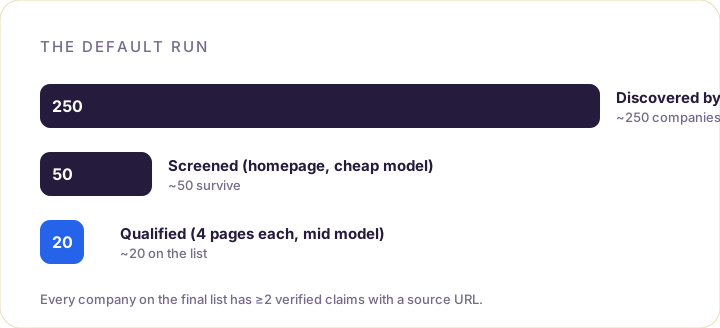
Screen. One look at the homepage (truncated, you don't need the whole thing), one cheap model call, one question: "Could this plausibly be in the ICP?" Not "is it," just "could it." In a default run this is about 250 homepages and it costs about a dollar in total. It cuts the pile to roughly 50.
Qualify. Now read. About, services, careers, news, four pages per company. Run the actual checks: industry, geography, size, company type, business model, problem evidence, hiring, funding, and the disqualifiers (competitor, not-a-company, already a customer, excluded by you). Every check gets a verdict of pass, fail, or unknown, and every pass gets a quote and the URL it came from.
The rule that keeps this honest: a check only passes if you can point at the page. Size is the classic trap. If the About page says "a team of 200" that's a pass with evidence. If nothing says a number, the answer is unknown, not a guess from how big the site looks. We literally force problem_evidence back to unknown if the model claims a pass without a quoted line from a fetched page.
If you're doing this by hand, do the same. A spreadsheet column for the URL next to every claim. It'll slow you down for about an hour and then save you from reaching out to a company that has 12 employees and a very impressive website.
Step 5: Rank the target account list with a formula you can explain
Don't let the model score. Let it judge individual checks, then compute the score from the verdicts.
Ours is four sub-scores (ICP fit, problem fit, timing, evidence strength), weighted 35/35/15/15, with the verdict-to-number mapping written down. I published the whole thing in our ICP scoring formula because a score you can't explain is a score you can't trust or tune.
Then a gate: a company only makes the list with at least two verified claims and a known industry or company type. Everything else goes in an "insufficient evidence" bucket you can inspect but don't act on.
What comes out is usually 10 to 25 companies. That number feels small the first time. Then you compare it to the 4,000-row export you were going to clean up by hand and it feels correct.
What each account on the list should carry
If a row in your target account list doesn't have all of this, it's not done:
- Why they fit, in two to four sentences that cite specifics
- Every claim with its source URL, and "Not found" where you looked and found nothing
- A reason to reach out now (a role posted this quarter, a stated goal, a launch)
- The likely buyer role
- Confidence, derived from how many claims are verified, not from vibes
The "reason to reach out now" is the one that changes your reply rate. It turns "we help logistics companies" into "I saw you're hiring three ops coordinators and your 2026 letter mentions automating shipment status." Same company, completely different email.
Where automation helps and where it doesn't
Honestly: steps 3 through 5 are tedious, mechanical, and exactly what a pipeline should do. Discovery across sources, screening 250 homepages, reading four pages each for 50 companies, checking that a quote actually appears on the page it's attributed to. A person can do it. A person shouldn't.
Steps 1 and 2 are where you should stay in the loop. When find-customer infers your ICP it stops and shows you the fields before any research starts, because the inference is good but it's inferring from a website you wrote to sound broader than you are. Thirty seconds of correcting it is the most valuable thing you'll do in the whole process.
Whether you run it yourself or let the tool do the reading, the shape is the same: your site, a written-down profile, sources that pre-qualify, cheap screen, expensive verification, a formula, a short list with receipts.
That's the list you'd actually put in your pipeline.